
Connect an app
SillyTavern
Connect SillyTavern to Kyara Intelligence as a custom OpenAI-compatible chat completion source.
SillyTavern connects to Kyara as a custom OpenAI-compatible chat completion source. You enter the Kyara base URL, save your API key, and choose a model ID. Have these ready:
- Your API key from the dashboard.
- A model ID from the catalog, for example
deepseek/deepseek-v4-flash.
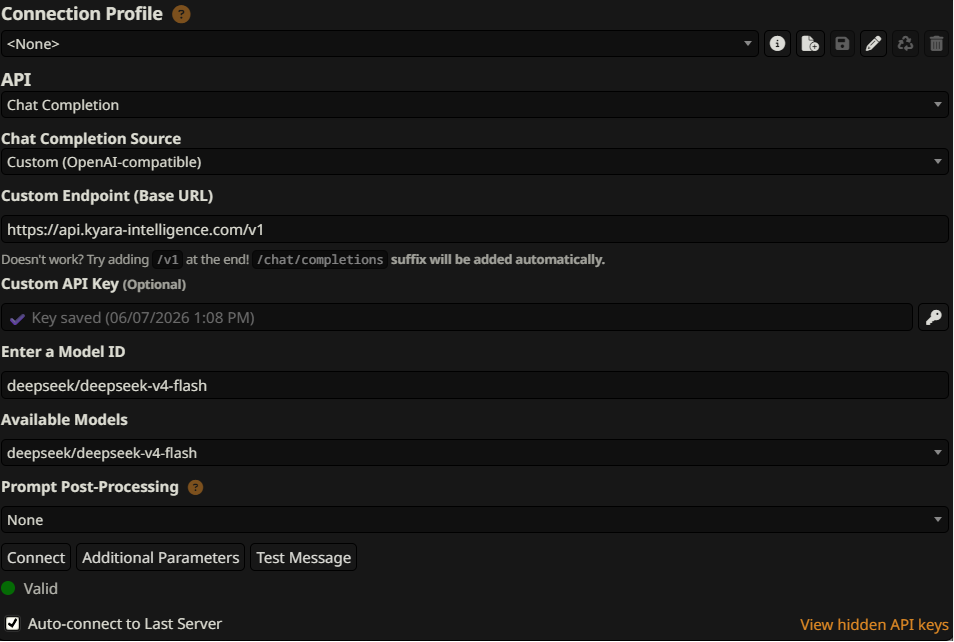
Set it up
Open API Connections
Click the plug icon in the top bar to open the API Connections panel.
Choose Chat Completion
Set API to
Chat Completion.Choose a custom source
Set Chat Completion Source to
Custom (OpenAI-compatible).Enter the base URL
In Custom Endpoint (Base URL), paste:
https://api.kyara-intelligence.com/v1Save your API key
Paste your key into Custom API Key, then click the key button next to the field so it is saved.
Choose a model
In Enter a Model ID, type a model ID from the catalog, for example:
deepseek/deepseek-v4-flashOnce connected, you can also pick a model from Available Models.
Connect and test
Click Connect, then Test Message. A green Valid status means you're connected.
Troubleshooting
It won't connect
Check these in order:
- The base URL ends in
/v1and nothing more. - The key was saved. Paste it again and click the key button.
- The model ID has no typos. Copy it from the catalog instead of typing it.
Which model should I start with?
Start with deepseek/deepseek-v4-flash for fast, low-cost replies while you set up. Once it works, browse
the catalog for larger context windows or stronger reasoning.
A feature isn't working
Kyara is text-only, so image input and tool calling are not available. See Unsupported features for the full list.
Check your key first
Before opening SillyTavern, export your key with export KYARA_INTELLIGENCE_API_KEY="your-api-key", then
send this request from the same terminal. A response with a choices array means the key works; an error with invalid_api_key means it is missing or wrong.
curl https://api.kyara-intelligence.com/v1/chat/completions \
  -H "Authorization: Bearer $KYARA_INTELLIGENCE_API_KEY" \
  -H "Content-Type: application/json" \
  -d '{
    "model": "deepseek/deepseek-v4-flash",
    "messages": [
      { "role": "user", "content": "Hello!" }
    ]
  }'